How to connect your finances to Claude
Add Hundo to Claude as a custom connector and ask it about your own money. Seven steps, no API key, and nothing gets written to your ledger without your say-so.
To connect Hundo to Claude, open Settings → Connectors in Claude, choose Add custom connector, enter the name Hundo Finance and the server URL https://hundo.finance/mcp, click Add and then Connect, then sign in to Hundo and click Approve.
Claude can read your net worth, your accounts, your budgets and your holdings, and draft changes you approve - from your own ledger, in the Claude you already use.
This is the specific walkthrough for Claude. If you use a different app, the setup page covers ChatGPT, Cursor and any other MCP client, and the wider argument for doing this at all is a separate read.
What do you need before you start?Link to this section
You need a Hundo account with some data in it, and Hundo Pro.
The order matters more than it looks. The server is only as useful as the ledger behind it, so put a few weeks of real transactions in first. Connecting Claude to an empty account works perfectly and tells you nothing.
What is Hundo's MCP server URL?Link to this section
One URL, the same for every account:
https://hundo.finance/mcp
Nothing in it identifies you. Your account is attached when you sign in and approve, which is steps 5 to 7 below. Settings has a copy button if you would rather not type it.
Add the connectorLink to this section
- Open Settings in Claude.
- Go to Connectors in the left sidebar.
- Open the Add dropdown at the top right and choose Add custom connector.
- Fill in the two fields:
- Name:
Hundo Finance - Remote MCP Server URL:
https://hundo.finance/mcp
- Name:
Leave the OAuth Client ID and Secret under Advanced settings empty. Hundo registers your client for you; those fields are for servers that make you create credentials by hand.
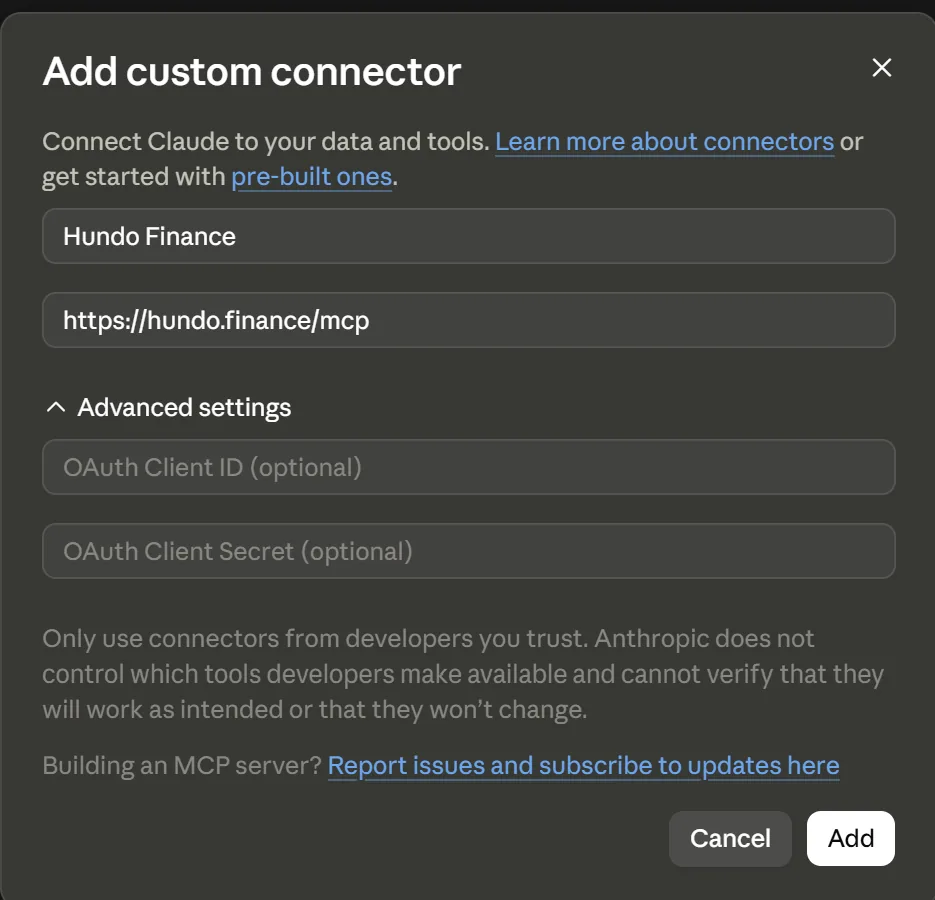
- Click Add. The connector appears with "You are not connected to Hundo Finance yet."
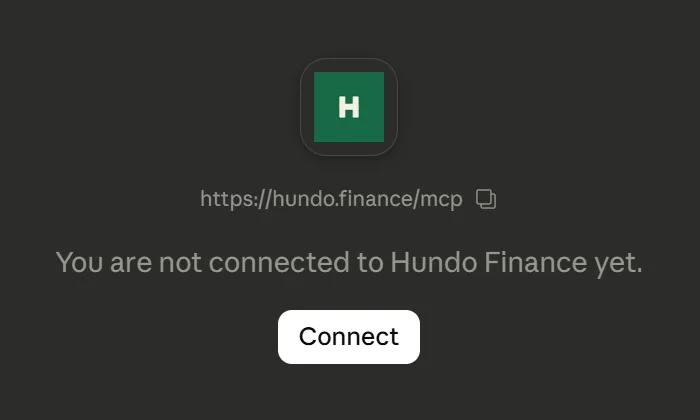
- Click Connect. Hundo opens in a new tab.
- Sign in if you are not already, then read the consent screen and click Approve.
It spells out exactly what you are granting: read your financial data, and draft changes it can only commit after you approve each one.
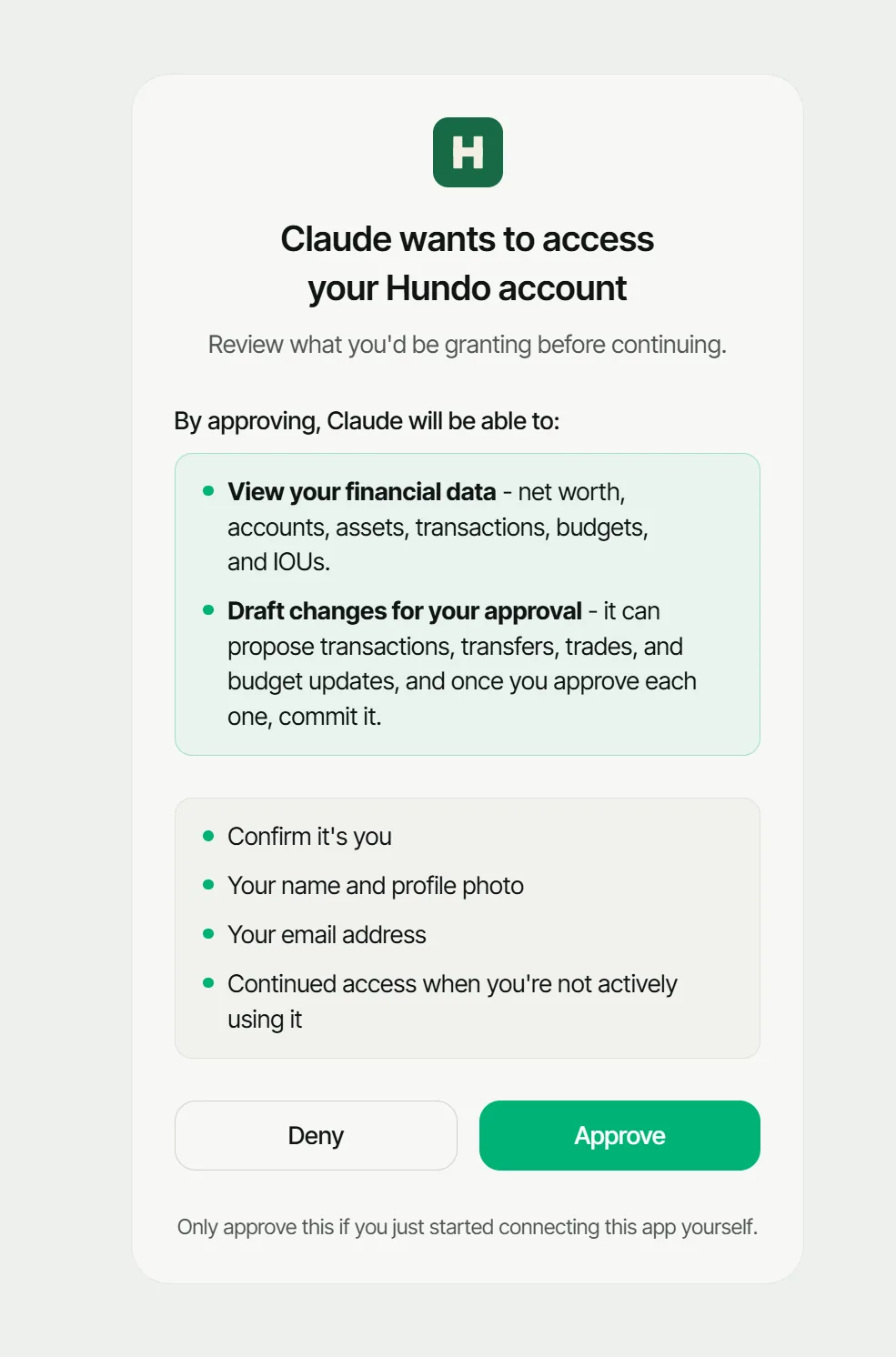
You land back in Claude, and it confirms "Connected to Hundo Finance."
Check it workedLink to this section
Ask for something only your own ledger could answer:
Give me a detailed report of last month's finances and some suggestions, based on the data from Hundo.
If your real numbers come back, you are connected.
What can you ask Claude about your finances?Link to this section
The read tools are the obvious half, and the interesting questions are the ones that need more than one of them at once:
Which category did I overspend in every month this quarter, and by how much?
My net worth went up last month. How much of that was actually saving, and how much was the market moving?
I have money owed to me in two currencies. What is it worth today in mine?
More questions like these, and how to check the answers, are in questions worth asking an AI about your own spending.
The other half is that Claude can write - but only in two steps.
Log the 24 euro dinner last night to Food.
Claude calls a propose_* tool, which returns a draft and touches nothing.
You say yes in the conversation.
Only then does it call confirm_proposal, and only then does anything reach your ledger.
A proposal you never confirm expires on its own.
That is worth understanding before you rely on it, because it is the difference between an assistant that can help with data entry and one that can quietly get your books wrong. The full tool list marks which tools read, which draft, and which one writes.
What if it does not work?Link to this section
"I don't see any Hundo tools." The server is added but not authorised - the step people skip. Reopen the connector and finish the sign-in and approval.
A message about Hundo Pro. The connection is fine and the plan is not. Connecting your own AI is part of Pro. Everything else about the tracker stays free and uncapped.
Claude answers from memory instead of your data. Name the source: "based on the data from Hundo". Once it has called a tool successfully it usually keeps doing so.
Does Hundo give Claude your bank login?Link to this section
No. Hundo has no bank connection and does not use an aggregator, so there are no bank logins in this - not in Hundo, and not handed to Claude.
What Claude can read is what you recorded: entries picked from your usual ones, typed, photographed, emailed to your own receipts address, imported from a file, or drafted by Claude and confirmed by you.
Common questionsLink to this section
Do I need an API key to connect Claude to Hundo?Link to this section
No. Leave the OAuth Client ID and Secret under Advanced settings empty, because Hundo registers your client for you.
Do I need Hundo Pro to connect Claude?Link to this section
Yes. Connecting your own AI to Hundo is part of Pro, and everything else about the tracker stays free and uncapped.
Can Claude change my Hundo data?Link to this section
Only in two steps: Claude calls a propose_* tool, which returns a draft and touches nothing, and only after you say yes in the conversation does it call confirm_proposal.
A proposal you never confirm expires on its own.
Why does Claude answer from memory instead of my Hundo data?Link to this section
Name the source in your message, for example "based on the data from Hundo". Once Claude has called a tool successfully it usually keeps doing so.